Here are the 2 most overpowered use cases we've found for it so far:
Find 100 thumbnail composition ideas for my next video, then generate the thumbnails.
Tell it your video idea and ask it to search our outlier database for 100 thumbnail composition ideas that led to 3x or higher outliers.
It searches the thumbnails of outlier videos from all over YouTube and brings back the ones that could make sense for your idea.
It then puts all of this research into a doc, so you can browse and pick out the ones you like best.
Here are the first 6 of the 100 it found for “I tried the cheapest everything for a week”:
127x @TomGillbanks
111x @ZachKlimes
22x @WearyWolfAdventures
20x @SichakCreative
17x @dallinhazard
12x @ReallyCruzLovesCheese
Then treat it like a mood board. Pick the 3 or 4 layouts you like best, describe the thumbnail you'd like (or let claude give it a go) and 1of10’s thumbnail generator makes new thumbnails for your video.
TRY TYPING
“Find me 100 thumbnail ideas from outliers in my niche, in adjacent niches, and outside my niche for my next video: I tried the cheapest everything for a week.”
Let it do your outlier research
This is the one the team has been using the most.
It's the fastest way we’ve found to get a lot of video inspiration at once. You give it your channel, and it digs through our outlier database and comes back with ideas built around real outlier data.
It then pitches these ideas to you like a real strategist would.
HOW TO USE IT
1. Start with your channel. Paste your channel link. Add a direction if you have one, like a topic, a series, or “things I can film at home”.
2. Ask for recent outliers. We’ve found the last 3 months, at 5x or more, works best. Ask for your niche, the niches next to it, and outside it.
3. Ask it to borrow formats. Title formats that blew up in other niches often work in yours, with your topic dropped in.
4. Ask it to splice formats. Two proven formats in one title, like “Give me 10 minutes and I’ll…” mixed with “…X% better at…”.
5. Ask for a few wild ones. Brand new premises nobody has made yet, built from parts that have already worked.
6. Push back. Ask which ideas your audience would actually click, cut the rest, and ask for more like your favourites.
In a few minutes you’ll have 100s of ideas, each with the outliers behind it. Use them as a starting point: pick the ones that spark something, then make them your own. When you like one, have it make the thumbnail too.
Or if you prefer, you can even skip the AI ideation part, and just have a research workhorse finding 100s of relevant outliers to inspire your next idea.
TRY TYPING
“Here’s my channel: [your channel link]. Find outliers from the last 3 months with a 5x or higher score, in my niche, the niches next to it and outside it. Then give me 25 video ideas based on them: mostly proven formats, a few that splice two formats together, and 2 or 3 experimental ones. Show at least 3 outliers supporting each idea for both the format, and interest topic.”
Here are 3 more real examples of what you can do with the 1of10 MCP.
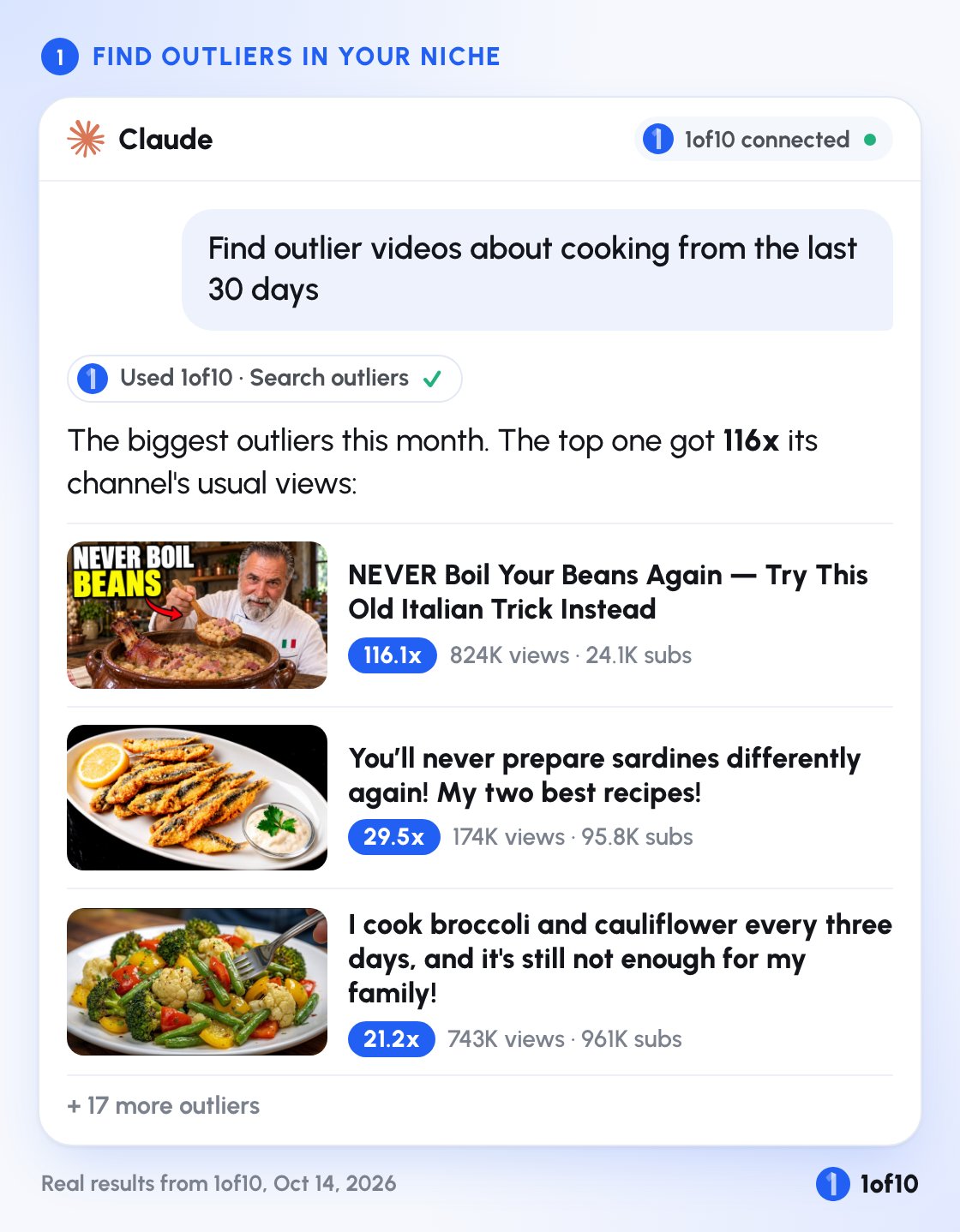
1. Find outliers in your niche
Ask for outliers on any topic. Here we asked for cooking outliers from the last 30 days:
The top one got 824K views on a channel with 24.1K subscribers. That’s 116x what that channel usually gets.
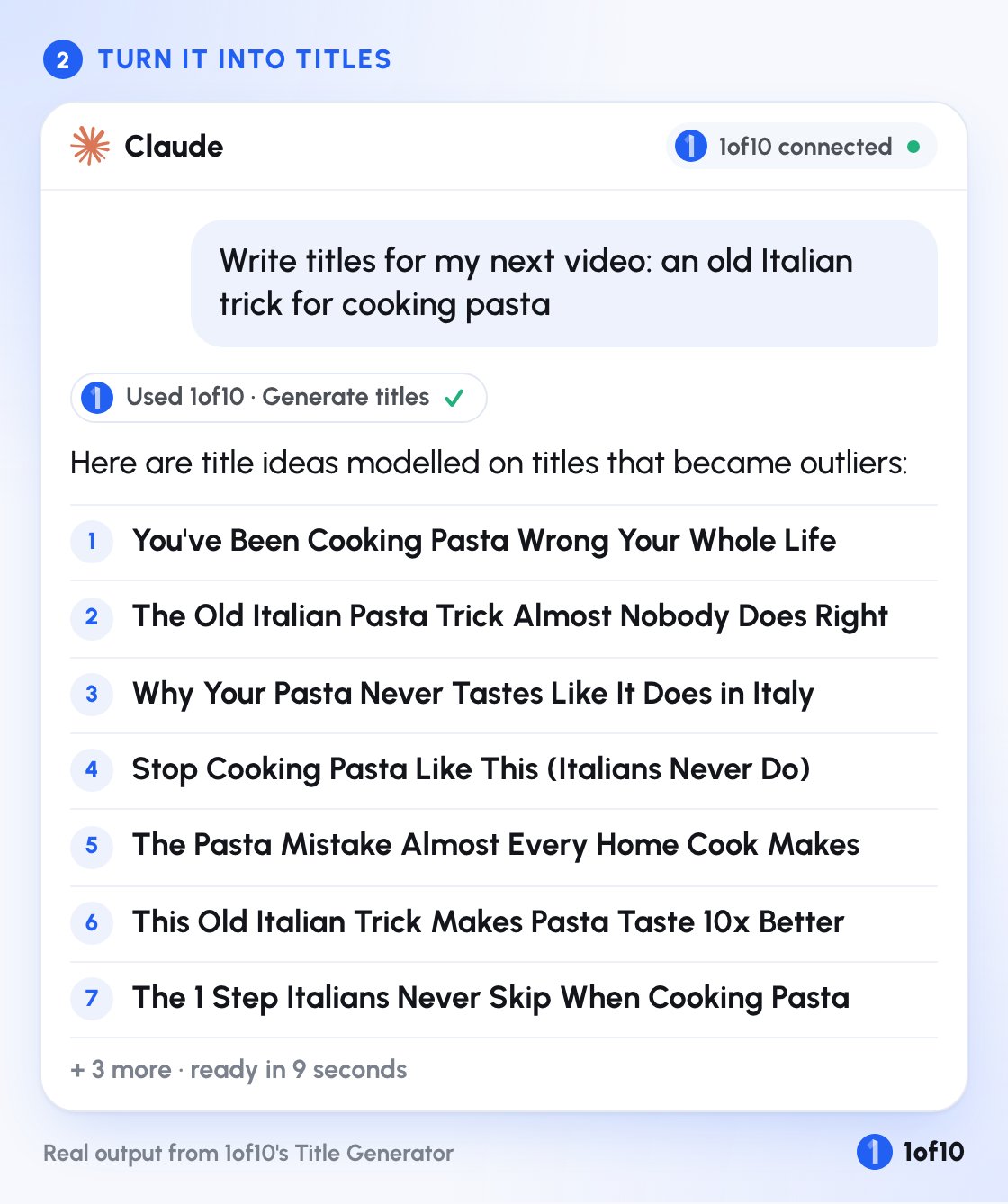
2. Turn them into titles
Then ask for titles for your own video. These came back in 9 seconds, each one modelled on titles that became outliers:
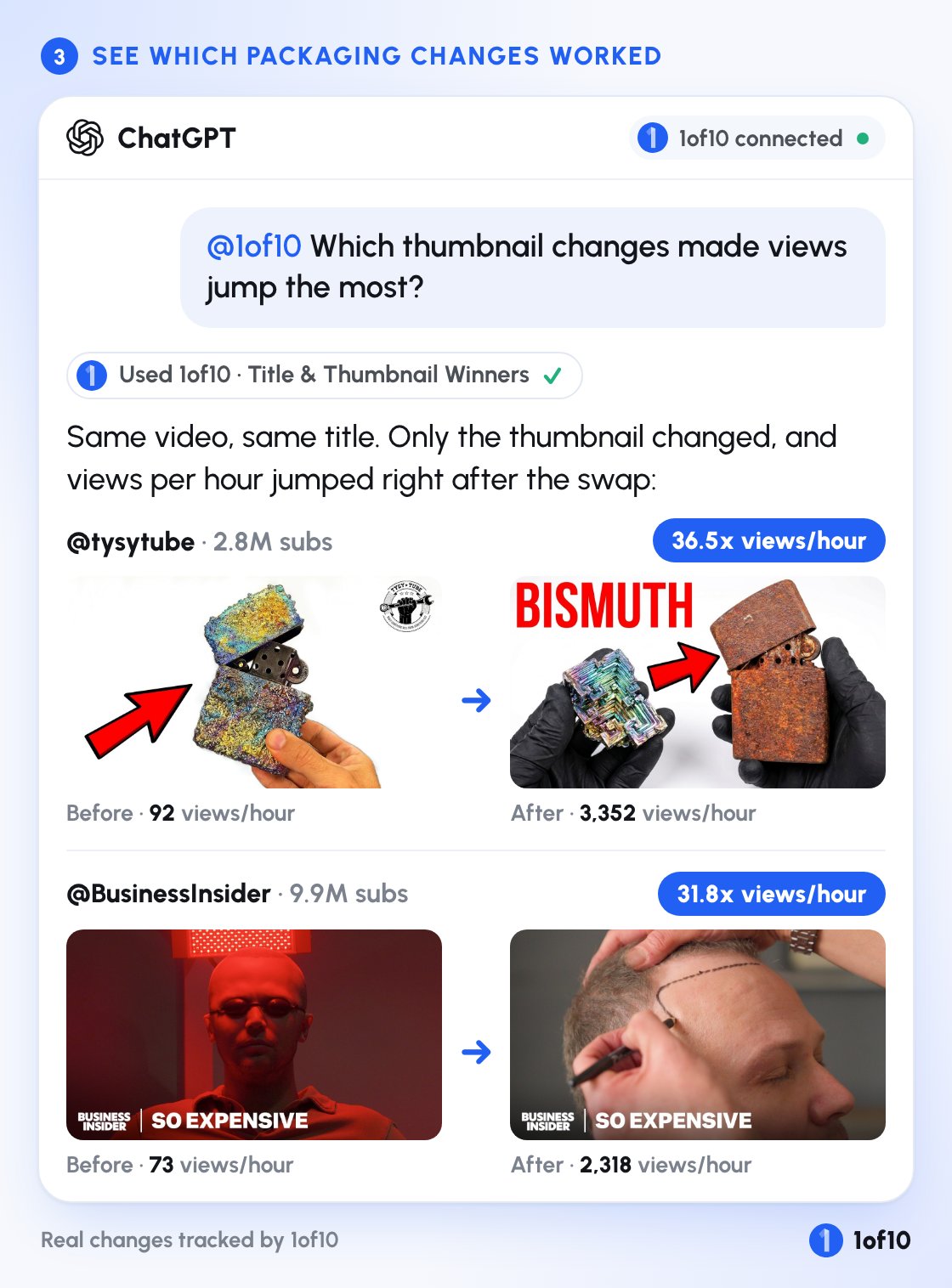
3. See which thumbnail changes actually worked
This one is my favorite. 1of10 tracks title and thumbnail changes on YouTube and spots the ones that made views jump. Ask about them and you get the before, the after, and how much views per hour went up:
Same videos, same titles. Just a new thumbnail.
Even more things you can ask for:
Pro and Ultra users can also run our tools straight from the chat:
Video idea generator: fresh ideas for your channel, based on what’s working in your niche.
Thumbnail generator: thumbnails in your channel’s style, then change the text or details.
Title generator: titles modelled on titles that became outliers.
Optimize: new title and thumbnail packages for videos you’ve already posted.
And a few more things you can type:
“Find videos similar to this one that did 10x.”
“Which channels are similar to mine?”
“Which outliers fit my channel?”
“Which of my competitors’ videos are beating their average this month?”
“What title formats are trending right now?”
“Give me 12 video ideas for my channel.”
“Make 4 thumbnails for this title.”
“Optimize my last video with 4 new title and thumbnail packages.”
“Save these 5 videos to a folder called October ideas.”
It uses the same data and the same tools as the app. It can’t delete anything in your account, and it only spends credits when you ask it to generate something.